


Daybook - Diary, Journal, Note
4.65.12K Reviews
App Specs
- Version
- 6.38.0
- Updated On
- License
- Free
- Downloads
- 1,000,000+
- Developer
- Daybook Labs Inc
- Categories
- Lifestyle
- Platform
- Android
Screenshots


 Analysis by AppCompare
I usually think of a diary as something private and personal, but using Daybook - Diary, Journal, Note made me look at it slightly differently. It can still be a quiet place for my own thoughts, yet its voice-to-write approach also makes it practical when I am busy, tired, or trying to capture a moment before it disappears. That matters in a household where one phone or tablet may move between people, because a journaling app needs to fit into real routines without turning private writing into a shared noticeboard.
Daybook is a lifestyle app from Daybook Labs Inc, available free of charge for users who want a straightforward digital journal. It has built a substantial audience, with over a million installs and a 4.6 average from around 59 thousand ratings. Those figures do not make it automatically right for everyone, but they do match my impression that the app is easy to understand and useful for regular, low-pressure journaling rather than a complicated productivity system.
How Daybook fits into a shared household
The most convincing use case for me is not a family writing one communal diary on a single device. It is several people using the same household environment while keeping their writing separate. One person might record a short reflection after work, another might note a child’s funny comment, and someone else might use the app for a private gratitude habit. The value comes from giving each person a simple place to write, not from treating the journal as a shared calendar or coordination board.
That distinction is important. Daybook works best when I think of it as a personal record that happens to be convenient on an everyday device. I would not use it as the main place to assign chores, announce appointments, or leave messages for everyone at home. A shared notes app, calendar, or messaging group is better for those jobs because those tools are designed around visibility and collaboration. A diary has a different purpose: it gives the writer room to remember, process, and organize experiences in their own voice.
Voice input is especially useful in a household scenario. If I am preparing dinner, walking back from school pickup, or trying not to wake someone while an idea is still fresh, speaking can be easier than typing a long entry. I found that this changes what I am willing to record. Instead of waiting for a quiet half hour, I can capture a few sentences and return to them later. That makes the app feel less like a formal writing exercise and more like a memory habit that can survive a busy day.
There is a useful trade-off here. Speaking is fast, but it can produce rougher wording than careful typing, and a spoken entry may include names or details I would not want another household member to hear. I would use voice writing in a private moment, then review the result before considering it finished. For sensitive topics, typing quietly is the safer routine even if it takes longer.
Starting without making the journal a family project
The first setup decision should be about ownership. If a phone is shared, I would avoid treating one open session as proof that everyone has equal access to everyone else’s thoughts. Each writer needs a clear personal boundary, and the simplest way to maintain that boundary is to use the app only within the person’s own device and account context. I would also avoid leaving the journal open on a kitchen counter or handing the device to a child while an entry is visible.
Worth Reading Before You Choose

EA SPORTS FC Mobile 26 Is a Bigger Football Game, but It Takes Time

Flipboard Shows What News Apps Must Do Beyond the Feed

Switching to Android Auto Means Rethinking Your Driving Routine

Google Calendar Makes a Crowded Week Easier to Manage

Ludo King Makes the Most of the Minutes Between Plans

Baby Panda World Brings Quick Play to Modern Phones, but Its Game Library Feels Busy
Daybook is rated for Everyone, which makes the app approachable for a broad audience, but an age rating is not the same thing as a promise that every journal entry is suitable for every reader. A diary can contain adult concerns, family disagreements, health details, or information about other people. I would explain that distinction to younger users in plain language: the app may be suitable to use, while the content they choose to write still deserves care.
This is also where I would set expectations about account boundaries. I would not create a single household identity and assume that personal writing will somehow remain private inside it. If several people use the same device, I would make a habit of closing the app after writing and checking which person is signed in before starting a new entry. That small pause is more valuable than any decorative journal feature because it prevents the most uncomfortable mistake: writing into the wrong personal space or exposing a previous entry.
For a child or teenager, I would introduce Daybook as an optional writing tool, not as a monitoring system. I would not ask to read every entry simply because the app is installed. Trust is part of the benefit of journaling; if the writer expects every thought to be inspected, the habit can become performative. At the same time, I would make it clear that safety concerns are different from ordinary curiosity. The right household conversation is about when to ask for help, not about turning a private diary into a daily report.
Using it alongside household coordination
Daybook can support coordination indirectly, but I would keep its role narrow. After a difficult appointment or a complicated day, I might write a personal account of what happened and then use a separate shared tool to communicate the practical facts. That separation helps me preserve an honest reflection without making the diary responsible for reminders, deadlines, or instructions other people need to see.
A realistic example is a weekend trip. I could dictate a quick entry about a child’s first train ride while the memory is vivid, then later add details about how the day felt. If the family needs the departure time or packing list, I would put those details somewhere shared. The journal is for the story and my perspective; the coordination tool is for information that must be acted on by everyone. Mixing those purposes usually creates confusion.
Another useful workflow is to write privately before having a household conversation. If a recurring disagreement is bothering me, I can describe what happened, identify what I actually need, and separate facts from assumptions. That does not solve the disagreement, but it can stop me from sending an impulsive message. In this role, the app becomes a thinking space rather than a communication channel.
I would also be careful with entries about other people. A journal is personal, but it can still contain someone else’s name, health information, or private story. Before dictating in a room with others, I would consider whether the wording could be overheard or whether a more general note would preserve the memory without exposing unnecessary detail. This is one of the less obvious habits that makes voice journaling work better in a busy home.
What makes the writing experience practical
The appeal is its low friction. Daybook is not asking me to design a complex system before I can begin. I can treat an entry as a sentence, a paragraph, or a longer reflection depending on the day. That flexibility is important because many journaling apps feel demanding when they present too many prompts, templates, or organization choices at the beginning.
I like the idea of using different entry lengths for different purposes. A quick voice note can preserve a moment, while a typed entry can help me think through a decision. I would not force both into the same routine. The strongest habit is the one that matches the situation: speak when speed matters, type when precision matters, and leave the entry short when that is all the day allows.
One practical tip is to record the detail that would otherwise vanish, rather than trying to summarize the whole day. The sound of rain during a school run, a surprising comment at breakfast, or the feeling after finishing a difficult task can bring back more than a generic sentence saying that the day was busy. Daybook’s quick-entry style supports that approach because I do not need to wait until I have a polished story.
I would still review important entries. Voice transcription can misunderstand names, places, or phrases, especially when I am speaking quickly or in a noisy room. I would correct anything that changes the meaning before relying on the entry as a future record. For private reflection, a small error may not matter; for dates, medical notes, or family history, accuracy matters much more.
Privacy, trust, and the limits of a personal diary
The word “secure” can create strong expectations, so I would approach any digital journal with sensible caution. I would not store passwords, payment details, access codes, or information that could cause serious harm if exposed. A journal is a useful place for memories and reflection, but it should not become the household’s secret vault for every sensitive fact.
That advice applies even when the app feels private during normal use. A shared device creates practical risks that have nothing to do with the quality of the writing interface. Notifications, an unlocked screen, an open app, or a person borrowing the phone can all reveal more than the writer intended. My routine would be simple: write in a suitable place, close the app when finished, and avoid dictating sensitive material where others can hear it.
For adults, this may be enough. For younger writers, I would add a conversation about what belongs in a diary and what should be discussed with a trusted adult immediately. A journal can help someone name feelings, but it should not replace support when there is danger, abuse, a serious health concern, or an urgent emotional crisis. The app can hold a reflection; it cannot provide the judgment and care of a responsible person.
This is also why I would not use Daybook as a hidden surveillance tool. Installing it on a shared device and expecting to inspect another person’s entries would undermine the trust that makes journaling useful. If a household needs shared visibility for schedules or safety check-ins, it should choose a tool built for that purpose and agree on the rules openly.
Where it stands against ordinary alternatives
Compared with a paper diary, Daybook is more convenient when I want to capture a thought immediately or speak instead of write. Paper still wins for people who enjoy handwriting, want a screen-free ritual, or prefer a physical object that stays outside the family’s devices. I would choose paper for a deliberate evening reflection and Daybook for moments that happen while I am moving through the day.
Compared with a basic notes app, Daybook feels more focused on the diary habit. A notes app is excellent for shopping lists, copied information, shared plans, and temporary reminders, but those mixed purposes can bury personal reflections. Daybook makes more sense when I want entries to belong to a continuing personal record rather than a pile of unrelated notes.
Compared with a calendar, it is the wrong tool for household scheduling. A calendar answers when something happens and who needs to remember it. A journal answers what the moment felt like and what I want to remember later. I would happily use both, but I would not expect Daybook to replace a shared calendar.
Compared with a highly structured mood or habit tracker, Daybook is better for open-ended thoughts and less suitable when I want precise charts, streaks, or measurable routines. If my goal is to compare daily symptoms or track a repeated behavior in a rigid format, a specialized tracker may be more efficient. If my goal is to understand the story behind those days, a journal is more comfortable.
Practical details before committing
The app is free to start, with optional in-app purchases ranging from $1.99 to $199.99 per item. I would begin with the free experience and decide only after using it long enough to know whether voice journaling and the general workflow fit my routine. In a household, I would be especially careful before making a purchase on a shared device, because the person who taps a purchase button may not be the person who manages the household budget.
Daybook has been available since January 1, 2017, and the current version is 6.38.0. It supports devices running Android 6.0 or later, so compatibility is broad enough for many older Android phones and tablets. I would still check the device before planning a household rollout, particularly if the phone is old or shared with several apps that compete for storage and attention.
The developer is Daybook Labs Inc, and the app’s large install base suggests it is not an obscure experiment. Still, popularity should not replace a personal test. I would spend several days trying short entries, voice input, and the device-sharing routine before moving years of memories into it. The important question is not whether the app looks appealing in a store, but whether I can use it consistently without weakening the boundaries I want around personal writing.
My household verdict
I recommend Daybook for a person who wants an easy personal diary and values the ability to speak an entry when typing feels inconvenient. It is particularly appealing for busy adults, reflective users who dislike rigid prompts, and families who can agree that personal journals are not the same thing as shared household tools. The app’s Everyone rating makes it approachable, but the household still needs mature rules about privacy, device access, and respectful use.
I would skip it if my main goal were a shared family planner, a task board, a detailed habit dashboard, or a fully screen-free journaling ritual. I would also hesitate if several people must use one unlocked device and nobody is willing to establish clear account and closing habits. In that situation, the problem is not Daybook’s writing concept; it is that a personal diary does not fit an uncontrolled shared-device environment.
My final impression is that the app succeeds by making journaling feel possible on ordinary days. The best result comes from using it modestly: capture one meaningful detail, dictate when that genuinely saves time, review important transcriptions, and keep coordination somewhere designed for shared visibility. For a household, the strongest feature is not sharing the diary; it is preserving a private space while everyone else uses their own tools. That makes Daybook a thoughtful lifestyle choice for personal memories, as long as trust and boundaries remain part of the setup.
Pros
- Clean
- distraction-free interface for quick daily entries.
- Supports photos
- voice notes
- and text in one personal journal.
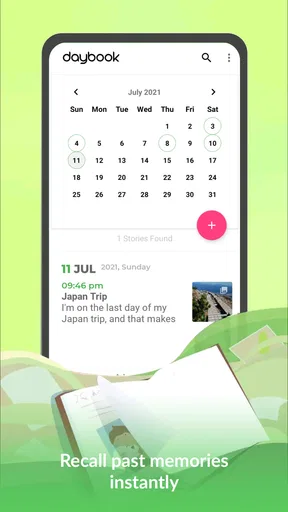
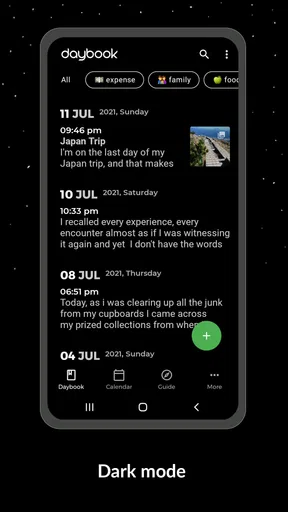
- Calendar view makes past memories easy to browse.
- Useful reminders encourage consistent journaling habits.
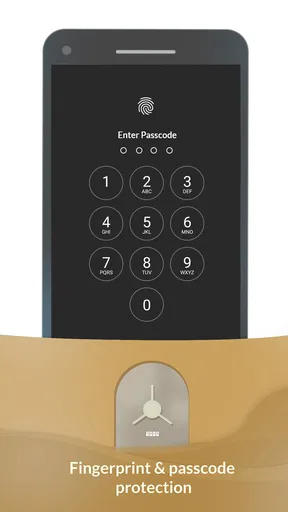
- Entries can be protected with a PIN or biometric lock.
Cons
- Some advanced features require a premium subscription.
- Cloud backup and syncing may depend on account setup.
- The free version may display ads or limit certain tools.
- Export options may not cover every preferred file format.
- Heavy media use can consume noticeable storage space.
FAQs for Daybook - Diary, Journal, Note
What is Daybook - Diary, Journal, Note used for?
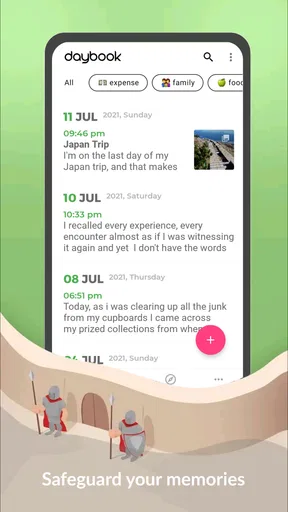
Daybook is a digital diary and journaling app designed for recording daily thoughts, memories, activities, ideas, and personal notes. You can create dated entries, add written reflections, and organize your experiences in one private space. It is useful for keeping a traditional diary, tracking routines, documenting important moments, or simply writing whenever you need to clear your mind.
Can I use Daybook without an internet connection?
Daybook can generally be used for writing and reading entries while offline, which is convenient when you are traveling or do not have a reliable connection. However, features that depend on online services, such as synchronization between devices, cloud backup, account access, or certain media functions, may require internet access. It is a good idea to reconnect regularly if you want your latest entries synchronized or safely backed up.
Are my diary entries private and secure in Daybook?
Privacy is an important consideration before storing personal information in any diary application. Daybook may provide security options such as an app lock, password, PIN, or biometric protection, depending on the device and version you use. Before writing highly sensitive content, review the app’s privacy settings, backup options, account policies, and permissions so you understand how your entries are stored and protected.
Can I add photos, audio, or other content to my journal entries?
Daybook is more than a simple text notebook and may allow users to enrich entries with additional content, such as photographs, locations, weather details, voice recordings, or other attachments, depending on the platform and available version. These features can make entries more personal and useful for documenting trips or special events, although some options may require extra permissions or an active internet connection.
Is Daybook free to download, and are there any limitations?
Daybook can typically be downloaded from the relevant Android or iOS app store, but availability of features may vary between the free and premium versions. Basic journaling may be available without payment, while advanced tools, expanded synchronization, additional customization, advertising removal, or other conveniences could require a subscription or in-app purchase. Check the current store listing for exact pricing and limitations before downloading.


